Using Proton Drive as a backup storage location with Rclone
I started using Proton as my default email service provider in 2022. I’ve more than 500Gb storage there available including a service called Proton Drive for file storage. This is quite a lot for just email. So I asked myself, how can I use the other amount of space as an extra backup storage solution?
I also published this article on my blog:
https://sebastix.nl/blog/using-proton-drive-as-a-backup-storage-location-with-rclone/
Quite a while ago I discovered a free and open-source tool called Rclone. It pretends to be a swiss knife for file management between different remote storage locations (more than 50 so-called cloud providers) including Proton Drive.
The following instructions are intended for Ubuntu which was my environment to test it out. They could apply for other Linux distros as well. Please follow the Rclone docs for more details.
Installing Rclone#
Follow the latest install instructions here.
Execute this command on your terminal
sudo -v ; curl https://rclone.org/install.sh | sudo bashand Rclone will be installed on your machine. To check if the installation succeeded, run rclone --version and a version will be return.
You can update Rclone easily with rclone selfupdate.
Execute rclone --help to return a full list with available commands.
Configure Rclone and Proton Drive#
Run rclone config and choose Proton Drive as a remote (option number 40 in my case).
After the config, get the name of the remote with rclone listremotes.
If this doesn't work out for you, please check the latest Proton Drive docs on Rclone here.
Copy or sync files to Proton Drive#
Let's create a simple file called copy-me.txt in the current directory.
echo 'this file will be copied to proton drive with rclone' > copy-me.txtExecute rclone -v copy copy-me.txt protondrive: and this will copy the backups.txt file to your Proton Drive.
The output will look something like this:

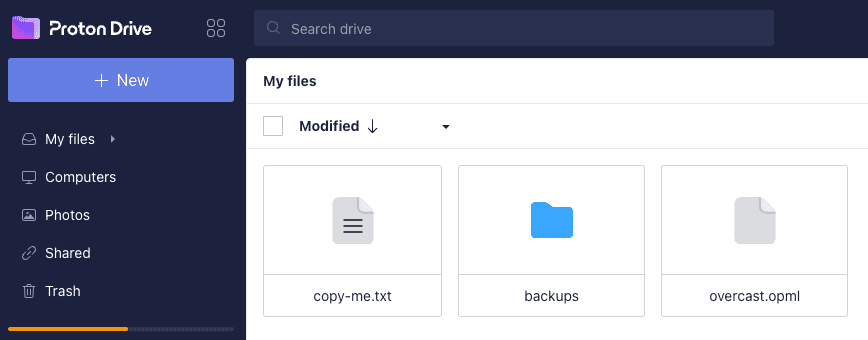
You can check if the file is in your Proton Drive by viewing your list of files at https://drive.proton.me/:
Automated backups with cronjobs#
We can use rclone sync to perform backup actions.
The full command will look something like this:
rclone sync -v --create-empty-src-dirs ~/backups protondrive:/backupsExecute crontab -e to edit your crontab file with cronjobs and add the following line:
3 0 * * * rclone sync -v --create-empty-src-dirs ~/backups protondrive:/backupsNow every night at 3am this command is executed.
Backing up docker volumes#
As a non-root user, you can’t access the directory with docker volumes at /var/lib/docker/volumes. You must login as root (sudo su) and config your rclone installation again with rclone config as we did earlier. After you’re done, you can copy/sync the docker volumes.
rclone sync -v --create-empty-src-dirs /var/lib/docker/volumes protondrive:/backups/docker-volumesYou could add this command with a cronjob as well with crontab -e under the user root.
Email output of the cronjobs#
To check if the cronjobs are running correctly, you can send an email with the output of the cronjob. Please read some solutions here how to manage that.
Solid solution? How long will it work?#
For now let's see how these Rclone commands with several cronjobs will run with Proton Drive for the coming period. I can imagine when a change is made on the Proton side, things could break on our side with Rclone. I hope I don't have to update Rclone too regular (let's say weekly) to keep things working.
Used resources

Sebastix
Follow my contributions on https://nostrver.se | Web of Trust foundation board member https://weboftrustfoundation.com | https://kubo.watch | https://nyves.nl | Nostr-PHP library maintainer | OpenSats grantee '24 | Creative solopreneur from 🇳🇱 | #PHP #Drupal #Javascript #Vue #InteractionDesign | Really cares about #FOSS #Privacy #Selfhosting #DigitalWellbeing | Hobbies #Cycling #Gravel #HondaCivic #Circuit
_@sebastix.dev Follow my contributions on https://nostrver.se | Web of Trust foundation board member https://weboftrustfoundation.com | https://kubo.watch | https://nyves.nl | Nostr-PHP library maintainer | OpenSats grantee '24 | Creative solopreneur from 🇳🇱 | #PHP #Drupal #Javascript #Vue #InteractionDesign | Really cares about #FOSS #Privacy #Selfhosting #DigitalWellbeing | Hobbies #Cycling #Gravel #HondaCivic #Circuit